


Take control of your manufacturing operations with Microsoft Dynamics 365 Business Central—the ERP trusted by modern manufacturers worldwide. Our Business Central for Manufacturing training is designed to help professionals and businesses streamline production, reduce costs, and improve decision-making with real-world manufacturing scenarios.
Microsoft Dynamics 365 Business Central for Manufacturing
Course Overview
This course is designed to provide a comprehensive understanding of manufacturing processes in Microsoft Dynamics 365 Business Central. Participants will learn how to plan, execute, track, and optimize manufacturing operations using Business Central’s powerful production and costing capabilities.
The course covers end-to-end manufacturing workflows, including production setup, bills of materials (BOMs), routings, production orders, capacity planning, material requirements planning (MRP), subcontracting, and manufacturing costing. Through practical examples and real-world scenarios, learners will gain hands-on experience in managing discrete manufacturing environments.
By the end of this course, participants will be able to confidently configure and use Business Central to streamline shop floor operations, improve production efficiency, control costs, and gain real-time visibility into manufacturing performance.
Business Central For Manufacturing
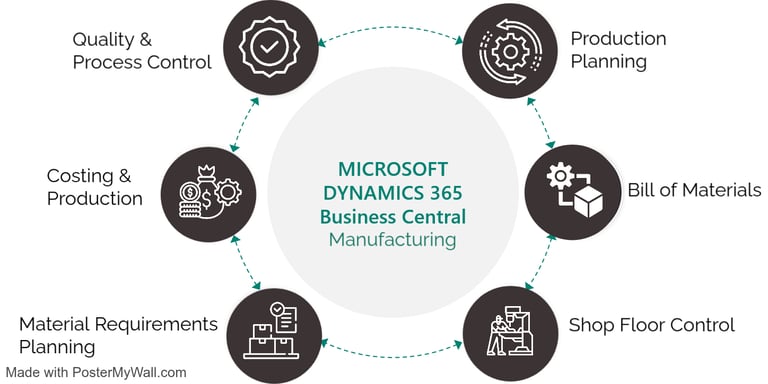
End-to-end manufacturing processes in Business Central
Production orders, BOMs, and routing setup
Capacity planning & shop floor control
Material requirements planning (MRP)
Costing methods & variance analysis
Inventory and warehouse integration
Manufacturing reports & insights
What you will learn?


Manufacturing professionals
ERP / Functional consultants
Business Central users working with production modules
Companies implementing Business Central for manufacturing
Who This Course Is For
✔ Practical, industry-focused approach
✔ Real manufacturing case studies
✔ Configuration & best practices
✔ Job-ready and implementation-ready skills
✔ Trainer-led by Business Central experts
Why Choose This Training?
By the end of this course, you’ll be able to configure, manage, and optimize manufacturing operations in Business Central—confidently supporting implementations, upgrades, and daily production challenges.
10+ Hours Online Training Session
Recordings for each session
24/7 Software Access
User guide and Assignments
Corporate Expert Certified Trainers
Flexible Time
Best Price in the Market
Refund Option*
Online One to One Training on Microsoft Teams

Talk to a Business Central Expert
Business Central Training - Key Features
10+ Hours of Comprehensive Business Central Training
Training Delivered by Industry Expert Professionals
In-Depth Coverage of Business Central Functional & Technical Concepts
Real-Time Business Scenarios and Practical Use Cases
Hands-On Training with Live System Access
Beginner to Advanced Level Curriculum
Live Instructor-Led Sessions with Recorded Access
Project-Based Learning for Real-World Experience
Career-Oriented Training Designed for Job Readiness
Post-Training Support and Guidance

Get in touch
Get Job-Ready with Business Central Training
About Us
Copyright © 2026 Learn Dynamics All Rights Reserved.
Business Central Academy, powered by Learn Dynamics, is a focused training hub built for professionals, consultants, and organizations looking to excel with Microsoft Dynamics 365 Business Central.
Our Courses
Microsoft Dynamics 365 Business Central - Functional Course
Microsoft Dynamics 365 Business Central - Technical Course
E-mail : Support@leaforge.com